Tuesday, October 11, 2011

305 Useful Windows Run Commands

Addusers - add or list users to/from a csv file
Ac3filter.cpl - opens ac3 filter (if installed)
Access.cpl – accessibility option control
Admintools - administrative tools control
Appwiz.cpl - add/remove programs
Arp - address resolution protocol
Assoc - change file extension associations
Associat - one step file association
At - schedule a command to run at a later time
Attrib - change file attributes
Bootcfg - edit windows boot settings
Browstat - et domain, browser and pdc info
Cacls - change file permissions
Calc - calculator
Call - call one batch program from another
Cd - change directory – move to a specific folder
Certmgr.msc – certificate manager
Change - change terminal server session properties
Charmap - character map
Chkdsk - check disk & check and repair disk problems
Chkntfs - check the ntfs file system
Choice - accept keyboard input to a batch file
Ciadv.msc – indexing service
Cipher - encrypt or decrypt files/folders
Cleanmgr - automated cleanup of temp files, recycle bin
Clearmem - clear memory leaks
Cliconfg - sql client configuration
Clip - copy stdin to the windows clipboard.
Clipbrd - clipboard viewer
Cls - clear the screen
Cluster - windows clustering
Cmd - command prompt
Color - change colors of the cmd window
Command – opens command prompt
Comp - compare the contents of two files or sets of files
Compact - compress files or folders on an ntfs partition
Compmgmt.msc - computer management
Compress - compress individual files on an ntfs partition
Con2prt - connect or disconnect a printer
Control admintools – amdinistrative tools
Control color - display properties (w/appearance tab preselected)
Control desktop - display properties & desktop properties
Control folders - folders properties
Control fonts – fonts properties
Control keyboard - keyboard properties
Control mouse - mouse properties
Control netconnections – network connections
Control printers – printer and fax options
Control schedtasks -schedualed tasks
Control userpassword2 – user accounts
Convert - convert a fat drive to ntfs.
Copy - copy one or more files to another location
Csccmd - client-side caching (offline files)
Csvde - import or export active directory data
Date - display or set the date
Dcomcnfg - dcom configuration utility & component services
Ddeshare - dde shares
Defrag - defragment hard drive
Del - delete one or more files
Delprof - delete nt user profiles
Deltree - delete a folder and all subfolders
Desk.cpl – display properties control
Devcon - device manager command line utility
Devmgmt.msc - device manager
Dfrg.msc - disk defragment
Dir - display a list of files and folders
Directx.cpl - direct x control panel (if installed)
Diruse - display disk usage
Diskcomp - compare the contents of two floppy disks
Diskcopy - copy the contents of one floppy disk to another
Diskmgmt.msc - disk management
Diskpart - disk partition manager
Dnsstat - dns statistics
Doskey - edit command line, recall commands, and create macros
Drwtsn32 - dr. Watson system troubleshooting utility
Dsadd - add user (computer, group..) To active directory
Dsmod - modify user (computer, group..) In active directory
Dsquery - list items in active directory
Dxdiag - direct x troubleshooter
Echo - display message on screen
Endlocal - end localisation of environment changes in a batch file
Erase - delete one or more files
Eudcedit - private character editor
Eventvwr.msc - event viewer
Exit - quit the cmd shell
Expand - uncompress files
Explorer – explorer
Extract - uncompress cab files
Fc - compare two files
Fdisk - disk format and partition
Find - search for a text string in a file
Findfast.cpl – findfast control
Findstr - search for strings in files
Firewall.cpl - windows firewall
Folders – folders properties
Fonts - fonts folder
For - loop command: all options files, directory, list
For /f - loop command: against a set of files or the results of any command
Forfiles - batch process multiple files
Format - format a disk
Freecell - free cell card game
Freedisk - check free disk space (in bytes)
Fsmgmt.msc - shared folders
Fsquirt - bluetooth transfer wizard
Fsutil - file and volume utilities
Ftp - file transfer protocol
Ftype - display or modify file types used in file extension associations
Global - display membership of global groups
Goto - direct a batch program to jump to a labelled line
Gpedit.msc - group policy editor (xp prof)
Hdwwiz.cpl - add hardware wizard
Help - online help
Hfnetchk - network security hotfix checker
Iexpress - iexpress wizard
If - conditionally perform a command
Ifmember - is the current user in an nt workgroup
Inetcpl.cpl – internet properties control
Intl.cpl – regional and language options
Ipconfig - configure ip
Ipconfig /all - ip configuration (display connection configuration)
Ipconfig /displaydns - ip configuration (display dns cache contents)
Ipconfig /flushdns - ip configuration (delete dns cache contents)
Ipconfig /registerdns - ip configuration (refreshes dhcp & re-registers dns)
Ipconfig /release - ip configuration (release all connections)
Ipconfig /renew - ip configuration (renew all connections)
Ipconfig /setclassid - ip configuration (modifies dhcp class id)
Ipconfig /showclassid - ip configuration (display dhcp class id)
Javaws - java control panel (if installed)
Joy.cpl – game controlloers control
Jpicpl32.cpl - java control panel (if installed)
Kill - remove a program from memory
Label - edit a disk label
Local - display membership of local groups
Logevent - write text to the nt event viewer.
Logoff - log a user off, logs you out of windows
Logtime - log the date and time in a file
Lusrmgr.msc - local users and groups
Magnify - windows magnifier
Mailto: - opens default email client
Main.cpl – mouse properties control
Mapisend - send email from the command line
Md - create new folders
Mem - display memory usage
Mklink - create a symbolic link (linkd)
Mmsys.cpl – multimedia (sounds and audio ) properties control
Mode - configure a system device
More - display output, one screen at a time
Mountvol - manage a volume mount point
Move - move files from one folder to another
Moveuser - move a user from one domain to another
Msconfig - system configuration utility
Msg - send a message
Mshearts - hearts card game
Msiexec - microsoft windows installer
Msimn - letterbox
Msinfo - windows nt diagnostics
Msinfo32 - system infomation
Mstsc - terminal server connection (remote desktop protocol)
Munge - find and replace text within file(s)
Nbtstat - display networking statistics (netbios over tcp/ip)
Ncpa.cpl - network connections
Netconnections - network connections control
Netdom - domain manager
Netsetup.cpl - network setup wizard
Netsh - configure network protocols
Netstat - display networking statistics (tcp/ip)
Netsvc - command-line service controller
Notepad - notepad
Now - display the current date and time
Nslookup - name server lookup
Ntbackup - backup folders to tape
Ntmsoprq.msc - removable storage operator requests
Ntrights - edit user account rights
Nusrmgr.cpl - user account management
Nvtuicpl.cpl - nview desktop manager(if installed)
Odbccp32.cpl - odbc data source administrator
Osk - on screen keyboard
Packager - object packager
Password.cpl – password properties control
Path - display or set a search path for executable files
Pathping - trace route plus network latency and packet loss
Pause - suspend processing of a batch file and display a message
Perfmon.msc - performance monitor
Perms - show permissions for a user
Ping - test a network connection
Popd - restore the previous value of the current directory saved by pushd
Portqry - display the status of ports and services
Powercfg.cpl – power options properties control
Prefetch – the thing windows prepairs
Print - print a text file
Printers - printers folder
Prncnfg - display, configure or rename a printer
Prnmngr - add, delete, list printers set the default printer
Prompt - change the command prompt
Psexec - execute process remotely
Psfile - show files opened remotely
Psgetsid - display the sid of a computer or a user
Psinfo - list information about a system
Pskill - kill processes by name or process id
Pslist - list detailed information about processes
Psloggedon - who’s logged on (locally or via resource sharing)
Psloglist - event log records
Pspasswd - change account password
Psservice - view and control services
Psshutdown - shutdown or reboot a computer
Pssuspend - suspend processes
Pushd - save and then change the current directory
Qgrep - search file(s) for lines that match a given pattern.
Quicktime.cpl - quicktime (if installed)
Rasdial - manage ras connections
Rasphone - manage ras connections
Rd - delete folder(s)
Rdisk - create a recovery disk
Recover - recover a damaged file from a defective disk.
Reg - registry: read, set, export, delete keys and values
Regedit - import or export registry settings
Regedit32 – registry editor
Regini - change registry permissions
Regsvr32 - register or unregister a dll
Rem - record comments (remarks) in a batch file
Ren - rename a file or files.
Replace - replace or update one file with another
Rmtshare - share a folder or a printer
Robocopy - robust file and folder copy
Route - manipulate network routing tables
Rsop.msc - resultant set of policy (xp prof)
Runas - execute a program under a different user account
Rundll32 - run a dll command (add/remove print connections)
Sc - service control
Schedtasks - scheduled tasks control
Schtasks - create or edit scheduled tasks
Sclist - display nt services
Scriptit - control gui applications
Secpol.msc - local security settings
Services.msc – various services
Set - display, set, or remove environment variables
Setlocal - control the visibility of environment variables
Setx - set environment variables permanently
Sfc – system file checker utility
Sfc /cachesize=x - system file checker utility (set cache size to size x)
Sfc /purgecache - system file checker utility (purge file cache)
Sfc /revert - system file checker utility (return to default setting)
Sfc /scanboot - system file checker utility (scan on every boot)
Sfc /scannow - system file checker utility (scan immediately)
Sfc /scanonce - system file checker utility (scan once at next boot)
Share - list or edit a file share or print share
Shift - shift the position of replaceable parameters in a batch file
Shortcut - create a windows shortcut (.lnk file)
Showgrps - list the nt workgroups a user has joined
Showmbrs - list the users who are members of a workgroup
Shutdown - shutdown the computer
Sigverif - file signature verification tool
Sleep - wait for x seconds
Soon - schedule a command to run in the near future
Sort - sort input
Spider - spider solitare card game
Start - start a separate window to run a specified program or command
Sticpl.cpl -scanner and camera control
Su - switch user
Subinacl - edit file and folder permissions, ownership and domain
Subst - associate a path with a drive letter
Sysdm.cpl- system properties control
Sysedit - system configuration editor
Syskey - windows system security tool
Systeminfo - list system configuration
Tasklist - list running applications and services
Taskmgr - task manager
Telephon.cpl - phone and modem options
Telnet - telnet client
Time - display or set the system time
Timedate.cpl – date/time properties control
Timeout - delay processing of a batch file
Title - set the window title for a cmd.exe session
Tlephon.cpl -telephone and moden options
Touch - change file timestamps
Tourstart - windows xp tour wizard
Tracert - trace route to a remote host
Tree - graphical display of folder structure
Type - display the contents of a text file
Usrstat - list domain usernames and last login
Utilman - utility manager
Ver - display version information
Verifier - driver verifier & utility verifier
Verify - verify that files have been saved
Vol - display a disk label
Waaucpl.cpl – automatic updates
Wab - windows address book
Wabmig - windows address book (adding something)
Where - locate and display files in a directory tree
Whoami - output the current username and domain
Win.ini - windows loading information(also system.ini)
Winchat - microsoft chat
Windiff - compare the contents of two files or sets of files
Winmine - minesweeper game
Winmsd - windows system diagnostics
Winmsdp - windows system diagnostics ii
Winver - shows current version of windows
Wmic - wmi commands
Wmimgmt.msc - windows management infrastructure
Write - wordpad
Wscui.cpl - security center
Wuaucpl.cpl - automatic updates
Wupdmgr - windows update launches
Xcacls - change file permissions
Xcopy - copy files and folders

Monday, July 18, 2011

Keponakanku masuk Sekolah Dasar

Tak terasa waktu begitu cepat bergulir, Anak dari kakak pertamaku, Evan Tobias Tanoni sudah masuk ke sekolah dasar. Melihat fotonya, seperti kembali ke masa lalu saat aku menginjak sekolah dasar dahulu. Begitu cepat, seperti mengedipkan mata saja. So, Life is short, Enjoy your Life :)

Tuesday, July 12, 2011

Microsoft Windows 8 and Windows 7


8 Microsoft to Windows probably will not be available next year. But based on what so far we know of these windows; The operating system can be much better than Windows 7

Perhaps no company more influential in the field of Microsoft desktop operating system not found. The software giant, the operating system market across the world and has proven to have any Windows version that is capable of with a lot of changes compared to previous versions of his offer. The nothing that is not Microsoft's operating systems market space well knows and knows that to succeed in this market must be what to do.

Windows 7 Maykrsaft arguably one of the most important versions of Windows operating system on the life. After providing Windows Vista, Microsoft began to grow against market and many sellers, the rules for Down grade to Windows XP computer had tons. Customers also expect that Microsoft had enough of Vista has not been welcomed. In addition, companies no Windows Vista did not count. Well all this is bad.

With Windows 7, Microsoft was able to fix Vista well. In fact, this version of the Vista operating system that would be. And now Microsoft has confirmed that Windows 7 fastest selling has had on Windows. It is clear that Windows users also use that now, at least most are happy with XP.

However the windows in the corner just eight scenes stands; rumors surrounding Microsoft's operating system and its features, rotate. Although little information currently available operating system, but one thing certainly can be said: the 8th of 7 would be better. But why?

1. Windows 8, based on a good operating system, is improved:
8 a large Windows update will not be considered. Instead, the improved version of the operating system of Windows 7 will be. As noted, Windows 7 among consumers and companies customer success is reached. Of the things we know so far about Windows 8, it is clear that Microsoft will not something that is not broken (Windows 7) to right! So probably very similar to Windows 8 Jdsh and many features it does happen. However, that improvement is always provided to customers also will be available in Windows.

2. Security will improve:
With each release of the operating system by Microsoft - or any other company - many security flaws are fixed. This company offers security of Windows XP Service Pack 2, has increased. Windows XP was almost safe. Of course not Pyshynsh generations than rival operating systems! Service Pack Vista were helped to safety. But arguably the most secure version of Windows 7 operating system is. Then where Microsoft always safer Amlsh system worked; expect that Windows 8, the seventh is fully secure.

3. Key compatibility with ARM:
According to the consumer electrical products in recent years, showed a keen interest in ARM; Steve Ballmer, CEO Microsoft announced that the next version of Windows-based devices will support ARM. It is very important. Now that the company wants to build products based on ARM chip, using the opportunity to find the windows. This move not only to Microsoft and retailers will help his colleague, but also probably more options that consumers tend to use Windows; will be given. The opinion of a board game - has won.


4. An application store? Maybe!
It is unlikely that Microsoft to offer an application store; map is drawn. >If this occurs, and despite the so many applications available for Windows is Microsoft may be able in this area even with Apple's Mac version of the Lion to compete. The same operating system with built AppStore will be sold. The future of desktop operating systems, there really good application for a store it will depend. Currently we do not know but if sent in future applications for construction of shop windows to hear; will be glad.

5. Urgent clarification: what is necessary
One of the biggest problems is that on some Windows computers, a lot of time to boot is wasting. According to the latest rumors, Microsoft is working on a solution for Windows that can actually work a little time to prepare. May not seem important, but keep in mind that a wait to boot Windows, how much punishment can be binding.Immediately after boot, something that could become a great possibility.

6. 8 for Windows probably would be more appropriate Tblt
There are several Microsoft operating systems when its ready for deployment is in Tblt knows. But given what the statistics show; time production based on Windows 7 Tblt was low and Android users or IP S. prefer him. Because support for ARM-based device and that Microsoft is definitely more for compatibility with Windows 8 will try Tblt; must await more portable devices based on Windows be next. But how much further the market will determine the character.


7. Saving more energy:
One of the problems that Windows 7 is unable to function effectively in the field of energy savings reach. But according to information leaked from the development of Windows 8 have Maykrvsfat apparently working on energy storage capability that greatly improve.Then wait for more battery life on portable devices that we support this operating system. If this is true; obviously consumers will be happy.

8. What is History Vault?
Windows 8 possibly a new feature called History Vault will. According to rumors, the Apple Time Machine-like feature would be an easy interface for backup on his Mac. S. X; offers. But this option will allow users to Microsoft that their personal files should recover, to amend the old file, and much more work ... Microsoft still has not confirmed this feature. But if a big feature like this, be added to Windows; will be excellent.

9. Better interface:
Windows 7 interface with a more powerful market that it can be quite better than previous generations knew her. The beauty of this feature does lack something.Currently much of Microsoft's next operating system, but probably not said his time Windows 8 will be the same interface. But people are always chasing Microsoft; believe that interface a little more efficient and easier to use. If Microsoft can do this is achieved, up to the expectations of many interfaces will suit. Because the current interface is also much less.

10. Microsoft Drssh learned:
Separate from the operating system, Windows 8 likely will be better than Windows 7. It also one reason: Microsoft Windows Vista will not fail to repeat. Microsoft's latest operating system before the seventh, this company was nothing less than a nightmare. 7 for Microsoft's success was too proud to work in Vista but ruined. The result, a few years were painful for the company. Microsoft also lack confidence in buyers and sellers and investors faced Gzaransh. So we expect that these companies do special to do with Windows 8. Meanwhile, the company except to achieve a better operating system, there would be another choice.

Source

Tuesday, June 28, 2011

FREE Listrik & FREE Energy untuk Semua Orang

Saya kaget ketika mendengar Pak Andre, rekan kerja saya berkata "seharusnya listrik bisa gratis lho!", "wew"!. Kita mengangkat tema pembicaraan tentang "Tesla". Nama apa itu? Mungkin bagi sebagian orang, nama itu sangat asing. Ini dia Nikola Tesla (klik disini). Setelah saya telusuri, mungkin kalian juga ingin tahu tentang listrik gratis dan free energy. Untuk itu, silahkan baca sendiri tentang cerita dibawah ini.
Quoted from the Tesla Insanity Main Page 
The following is a short Tesla bio that I did for school with the topic of "People who have gone against the status quo." -- Thomas Samstag

Nikola Tesla
The Forgotten Father of Today

      One of the greatest minds of the 19th and 20th centuries, responsible for today's modern world, Nikola Tesla is still virtually unknown to today's textbooks, teachers, and general public. Thinking back to your high school years and looking through an encyclopedia, who do you remember as the inventor of radio? The name that probably comes to mind is Marconi. And if I asked the same about X-rays, you'd probably say Roentgen. And a vacuum tube amp, probably de Forest. While you're at it, who invented the florescent bulb, neon lights, speedometer, auto ignition system, and the basics behind radar, the electron microscope, and the microwave oven? Chances are you see little, if any, mentions of Tesla. Very few people today have ever even heard of him. The all-around nice guy Thomas Edison made sure of that.

      Nikola Tesla was born in Smijlan, Croatia (now Yugoslavia) in 1858. Young Nikola had a great memory and spoke six languages. He spent four years at the Polytechnic Institute at Gratz studying math, physics, and mechanics. The amazing thing about him was that he had a great understanding of electricity (remember that this was at a time when electricity was still at infancy, the electric light bulb hadn't even been invented yet).

      Tesla moved to the United States in 1884. When he arrived, he worked as an assistant to Thomas Edison, then in his late 30's. Edison had just invented the electric light bulb, but he needed a system to distribute electricity to houses. He designed a DC (direct current) system, but it had many bugs in it. Edison promised Tesla lots of money in bonuses if he could get the bugs out. Tesla took the challenge and ended up saving Edison over $100,000, which was millions of dollars by today's standards. Edison later refused to keep his promise. Tesla quit not long after that, and Edison spent the rest of his life trying to discredit Tesla (which is the main reason why he is so unknown today).

      In 1888, Tesla devised a better system of transmission, the AC (alternating current) system used in houses around the world today. By using Tesla's newly developed transformers, AC could be stepped up and transmitted over long distances through thin wires. Edison's DC couldn't be stepped up, required a large power plant every square mile and thick cables for transmission.

      Electricity is useless if it can't do anything, so in 1890, Tesla invented a motor to run on AC, the same type of motor used in every household appliance today. Scientists of the late 1880's were convinced that no motor could work with AC. After all, AC electricity reverses itself 60 times a second, so all previous motors would just rock back and forth 60 times a second. Tesla solved this problem and proved them all wrong.

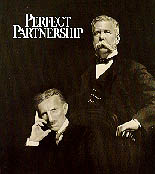
      Word of AC eventually got to George Westinghouse. In 1893, Tesla signed a contract with Westinghouse to get $2.50 per Kilowatt of AC sold. Nikola finally had the money to conduct all of the experiments that he had dreamt of.
 

      Tesla developed and used florescent bulbs in his lab some 40 years before industry "invented" them. At the World's Fair, Tesla took glass tubes and bent them into famous scientists' names- the first neon signs. Tesla also designed the world's first hydroelectric plant at Niagara Falls in 1895. Tesla also patented the first speedometer for cars in 1916. In fact, Tesla invented all of the things that are listed at the beginning of the paper.

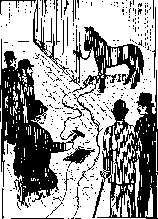
      But Edison soon had too much money invested into his DC system, and he tried his best to discredit Tesla by showing that AC was more dangerous than DC. Edison paid local children 25 cents for each stray dog they could bring him. Then he would hold press conferences and electrocute the dogs at public gatherings to frighten people. He claimed that DC could not kill, but in fact, it could. Below is a drawing from 1889 of a horse being electrocuted in Edison's Menlo Park Laboratory.

      Edison felt that it was necessary to experiment by killing animals before he could guarantee his electric chair would kill efficiently.

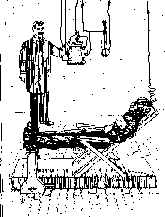
      Yes, it was actually Edison who invented the electric chair to frighten people away from Tesla's AC system, as shown in the below drawing from 1890.

      But Tesla counteracted by staging his own marketing campaign. At the 1893 World Exposition in Chicago, attended by 21 million, Tesla demonstrated the safety of AC by passing high frequency AC through his body to power light bulbs. He was then able to shoot large lightning bolts into the crowd without harm.

      When royalties owed to him by Westinghouse exceeded $1 million, Westinghouse ran into financial trouble. Tesla realized that if he kept his contract, Westinghouse would go out of business, so Tesla took his contract and ripped it up! Instead of becoming the first billionaire, he got $216,600 outright for his patents.

      In 1898, Tesla demonstrated the first remote controlled model boat at Madison Square Garden. After all of these technological breakthroughs, Tesla still had not achieved his lifelong dream. All Tesla's life, he had dreamt of free wireless energy and other signals to the world.

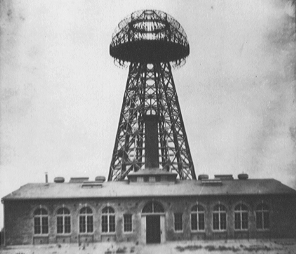
      In 1900, Tesla was backed with $150,000 from J. P. Morgan. Tesla began construction of "Wireless Broadcasting System" tower on Long Island, New York. Tesla intended to use it to link the world's telephone and telegraph and to transmit pictures, stock reports, and weather information.

      When Morgan found out that it meant FREE energy, he cut Tesla's funding. There is still a lot of controversy to what happened to Tesla's original tower. One story says that the government tore it down during World War I for fear that the German U-boat spies would use the tower as landmark to navigate by. Another story says that Tesla ran into financial trouble and sold the tower for scrap to pay off creditors.

      The world thought that Tesla was crazy. Transmission of voice and pictures was unheard of in that time. What they didn't know is that he had already demonstrated the principals behind radio nearly ten years before Marconi's supposed invention. In 1943, the year that Tesla died, the Supreme Court ruled that Marconi's patents invalid due to Tesla's previous descriptions, but yet most textbooks and encyclopedias credit Marconi.

      The Press started to exaggerate Tesla's claims. Tesla reported that he received radio signals from Mars and Venus. Today we know that these were really signals from distant pulsing stars.

      In his Manhattan lab, Tesla made Earth into and electric tuning fork. He made a steam driven oscillator vibrate at the frequency of the ground beneath him. The result was a small earthquake in the surrounding city blocks. It was here that he contended that in theory, he could do the same to even split the earth in two. He accurately determined the resonant frequency of Earth almost 60 years before science could confirm it.

      In his Colorado Springs, Colorado lab, in 1899, Tesla made what he thought was his biggest discovery ever-- terrestrial stationary waves. He sent waves of energy through Earth that bounced back to the source. When they came back, he added more electricity to it. He lighted 200 lamps without wires from a distance of 25 miles and created the biggest man-made lightning bolt ever, 130ft. long! That's a world record still unbroken. Strange electrical things happened near that lab. People would walk near the lab, and sparks would jump up from the ground to their feet One boy took a screwdriver, held it near a fire hydrant, and drew a four inch electrical spark from the hydrant. Sometimes the grass around his lab would glow with an eerie blue corona, St. Elmo's Fire. What they didn't know was this was small stuff. The man in the lab was merely tuning up his apparatus. Unfortunately, he blew out some of the power plant's equipment and was never able to repeat his experiment.

      At the beginning of World War I, the government desperately searched for a way to detect German submarines. The government put Thomas Edison in charge of the search for a good method. Tesla proposed the use of energy waves - what we know today as radar - to detect these ships. Edison rejected Tesla's idea as ludicrous and the world had to wait another 25 years until it was invented.

      What was his reward for a lifetime of creativity? The prized (to everyone but Tesla) Edison Medal! A real slap in the face after all the verbal abuse Tesla took from Edison.

      Lacking capital, he was forced to place his untested theories into countless notebooks. The man who invented the modern world died nearly penniless at age 86 on January 7, 1943. More than two thousand people attended his funeral. In his lifetime, Tesla received over 800 different patents. He probably would have exceeded Edison's record number if he wasn't always broke - he could afford very few patent applications during the last thirty years of his life.

      Unlike Edison, Tesla was an original thinker whose ideas typically had no precedent in science. Unfortunately, the world does not financially reward people of Tesla's originality. We only award those that take these concepts and turn them into a new, useful product.

      Scientists today continue to scour through his notes. Many of his far-flung theories are just now being proven by our top scientists. For example, the Tesla bladeless disk turbine engine that he designed, when coupled with modern materials, is proving to be among the most efficient motors ever designed. His 1901 patented experiments with cryogenic liquids and electricity provide the foundation for modern superconductors. He talked about experiments that suggested particles with fractional charges of an electron - something that scientists in 1977 finally discovered - quarks!

      Tesla was one of the world's most original and greatest inventors and thinkers, but because he was so original and out of his time, his genius was mistaken for insanity and science fiction. Maybe next time, the world will recognize a true genius when it comes around.
Jadi, bagaimana menurut kalian? silahkan ambil kesimpulan sendiri tentang cerita tadi. Tetapi yang jelas, benar apa kata Bang Iwan Fals "Politik itu Kejam"

Thursday, April 28, 2011

It's journey not destination

You know some famous guy once said "to travel is better than to arrive". And I wasn't know like, what? maybe because I used to think that there is only one path to take to what you gonna be in life; but if you choose that one path, it doesn't mean you have to ban the other ones. I realize it, if I see what happen along the way, that counts; to stumbles, to falling and a friendship. It's journey not destination. I trust that the future will work so fine like it suppose to.

Sunday, April 24, 2011

Annotated Azeroth

Rook's Azeroth, Annotated
Three years after making this, two expansions later, this map is SO wrong and I get that. Long overdue for a new one to be drummed up and I might! We'll see, we'll see. -2010

This thing is 3000 pixels wide. You cannot read the notations at this size, so if you actually care what any of it says, you're gonna want to view it at full. (Nothing you don't already know if you play WoW, just in my handwriting with the occasional "here there be dragons.")

First thing's first, I didn't draw the continents, I only manipulated the hell out of them. My own crinkled paper stock, with Kuschelirmel_Stock's Splat! and Grunge brushes. The map belongs to Blizzard, full stop. WoW, too.

Anyway, I thought it would be neat to "see" what the map Panderbrook has been using for the past forever looks like. You know, it's the same map, every time you hit the M key, it's GOTTA look beat to hell by now. And Lo. It is.

And hey if anyone wants to use the 1024 preview as a desktop wallpaper, I'm fine with that. It's fun. I'd do it myself if I wasn't running uberwidescreenofdoom.

Photoshop, 2007

Edited to Add: My husband just asked, "Does she have a map of Outland?"
...Damnit!
Well I guess I know what I'm doing next. =/
Credits & Full Quote by Pickwick
Website counter [Close]