Showing posts with label technology. Show all posts

Monday, November 10, 2014

Ingress - Viva La Resistance!

Ingress - Its time to move.

What is Ingress? You can learn from that Video.
But be careful, you need to Join Resistance Faction,
Why? Because We Protect Humanity!

Official Site: www.ingress.com

Saturday, July 27, 2013

Steve Jobs Quotes

I'm the only person I know that's lost a quarter of a billion dollars in one year.... It's very character-building. 
Steve Jobs, Apple Confidential 2.0

Every good product I've ever seen is because a group of people cared deeply about making something wonderful that they and their friends wanted. They wanted to use it themselves. 
Steve Jobs, Apple WWDC Closing Keynote, 1997

I don't think it's good that we're perceived as different I think it's important we're perceived as MUCH BETTER. If being different is essential to doing that, then we have to do that, but if we could be much better without being different, that'd be fine with me. I want to be much better! I don't care about being different, but we'll have to be different in some ways to be much better. 
Steve Jobs, Apple WWDC Closing Keynote, 1997

I'm sure a lot of you had this experience when you're changing. You're growing as a person and people tend to treat you like you were 18 months ago, and it's really frustrating sometimes when you're growing up and you're more capable. It's the same thing with a company and the press. The press is going to have a lag time. The best thing we can do about the press is embrace them and do the best thing we can to educate them about our strategy. But to keep our eye on the prize, that is turning out some great products. the press and the stock prize will take care of themselves. 
Steve Jobs, Apple WWDC Closing Keynote, 1997

The hardest thing when you think about focusing. You think focusing is about saying "Yes." No. Focusing is about saying "No." And when you say "No," you piss off people. 
Steve Jobs, Apple WWDC Closing Keynote, 1997

I'm as proud of what we don't do as I am of what we do.
Steve Jobs, Business Week

Quality is more important than quantity. One home run is much better than two doubles.
Steve Jobs, Business Week

I've always wanted to own and control the primary technology in everything we do. 
Steve Jobs, BusinessWeek Online, Oct. 12, 2004

It comes from saying no to 1,000 things to make sure we don't get on the wrong track or try to do too much. 
Steve Jobs, BusinessWeek Online, Oct. 12, 2004

It's really hard to design products by focus groups. A lot of times, people don't know what they want until you show it to them. 
Steve Jobs, BusinessWeek, May 25 1998

Innovation has nothing to do with how many R&D dollars you have. When Apple came up with the Mac, IBM was spending at least 100 times more on R&D. It's not about money. It's about the people you have, how you're led, and how much you get it. 
Steve Jobs, Fortune, Nov. 9, 1998

Insanely Great! 
Steve Jobs, His description for the Macintosh Computer

I'm convinced that about half of what separates the successful entrepreneurs from the non-successful ones is pure perseverance. 
Steve Jobs, Interview, 1995

It's better to be a pirate than to join the Navy. 
Steve Jobs, Odyssey: Pepsi to Apple

It's rare that you see an artist in his 30s or 40s able to really contribute something amazing. 
Steve Jobs, Playboy, February 1985

I feel like somebody just punched me in the stomach and knocked all my wind out. I'm only 30 years old and I want to have a chance to continue creating things. I know I've got at least one more great computer in me. And Apple is not going to give me a chance to do that. 
Steve Jobs, Playboy, September 1987

Almost everything--all external expectations, all pride, all fear of embarrassment or failure--these things just fall away in the face of death, leaving only what is truly important. Remembering that you are going to die is the best way I know to avoid the trap of thinking you have something to lose. You are already naked. There is no reason not to follow your heart.
Steve Jobs, Stanford Commencement Adress, 2005

No one wants to die. Even people who want to go to heaven don't want to die to get there. And yet, death is the destination we all share. No one has ever escaped it, and that is how it should be, because death is very likely the single best invention of life. It's life's change agent. It clears out the old to make way for the new. 
Steve Jobs, Stanford Commencement Adress, 2005

Remembering that I'll be dead soon is the most important tool I've ever encountered to help me make the big choices in life. 
Steve Jobs, Stanford Commencement Adress, 2005

Sometimes life is going to hit you in the head with a brick. Don't lose faith. 
Steve Jobs, Stanford Commencement Adress, 2005

You can't connect the dots looking forward you can only connect them looking backwards. So you have to trust that the dots will somehow connect in your future. You have to trust in something: your gut, destiny, life, karma, whatever. Because believing that the dots will connect down the road will give you the confidence to follow your heart, even when it leads you off the well-worn path. 
Steve Jobs, Stanford Commencement Adress, 2005

You've got to find what you love and that is as true for work as it is for lovers. Your work is going to fill a large part of your life and the only way to be truly satisfied is to do what you believe is great work. And the only way to do great work is to love what what you do. If you haven't found it yet, keep looking and don't settle. As with all matters of the heart, you'll know when you've found it. 
Steve Jobs, Stanford Commencement Adress, 2005

Your time is limited, so don't waste it living someone else's life. Don't be trapped by dogma, which is living with the results of other people's thinking. Don't let the noise of other's opinions drown out your inner voice. And most important, have the courage to follow your heart and intuition. They somehow already know what you truly want to become. Everything else is secondary. 
Steve Jobs, Stanford Commencement Adress, 2005

I didn't see it then, but it turned out that getting fired from Apple was the best thing that could have ever happened to me. The heaviness of being successful was replaced by the lightness of being a beginner again, less sure about everything. It freed me to enter one of the most creative periods of my life. 
Steve Jobs, Stanford University commencement address, June 12, 2005

Do you want to spend the rest of your life selling sugared water or do you want a chance to change the world? 
Steve Jobs, The line he used to lure John Sculley as Apple's CEO

A lot of companies have chosen to downsize, and maybe that was the right thing for them. We chose a different path. Our belief was that if we kept putting great products in front of customers, they would continue to open their wallets. 
Steve Jobs

Be a yardstick of quality. Some people aren't used to an environment where excellence is expected.
Steve Jobs

Design is not just what it looks like and feels like. Design is how it works.
Steve Jobs

Here's to the crazy ones, the misfits, the rebels, the troublemakers, the round pegs in the square holes... the ones who see things differently -- they're not fond of rules... You can quote them, disagree with them, glorify or vilify them, but the only thing you can't do is ignore them because they change things... they push the human race forward, and while some may see them as the crazy ones, we see genius, because the ones who are crazy enough to think that they can change the world, are the ones who do. 
Steve Jobs
I think we're having fun. I think our customers really like our products. And we're always trying to do better. 
Steve Jobs

In most people's vocabularies, design means veneer. It's interior decorating. It's the fabric of the curtains of the sofa. But to me, nothing could be further from the meaning of design. Design is the fundamental soul of a human-made creation that ends up expressing itself in successive outer layers of the product or service. 
Steve Jobs

Innovation distinguishes between a leader and a follower. 
Steve Jobs

So we went to Atari and said, 'Hey, we've got this amazing thing, even built with some of your parts, and what do you think about funding us? Or we'll give it to you. We just want to do it. Pay our salary, we'll come work for you.' And they said, 'No.' So then we went to Hewlett-Packard, and they said, 'Hey, we don't need you. You haven't got through college yet.' 
Steve Jobs

Sometimes when you innovate, you make mistakes. It is best to admit them quickly, and get on with improving your other innovations. 
Steve Jobs

The people who are doing the work are the moving force behind the Macintosh. My job is to create a space for them, to clear out the rest of the organization and keep it at bay. 
Steve Jobs

You can't just ask customers what they want and then try to give that to them. By the time you get it built, they'll want something new. 
Steve Jobs

Friday, July 5, 2013

Memory Dump

0x000000ea 0x891c0400, 0x8a384a70, 0xf78c6cbc, 0x00000001, it is memory dump example.

1. IRQL_NOT_LESS_OR_EQUAL (0X0000000A)
Ini merupakan biangnya kerok pada BsOD. Karena umumnya pada BsOD, pesan ini yang paling sering muncul. Pesan kesalahan ini disebabkan umumnya kerena ada ketidakcocokan driver yang terinstall di komputer.

Daftar Penyebab:
  • Masalah driver yang bentrok atau tidak cocok
  • Masalah Video Card, hal ini mencakup video card yang di overclock melebihi batas atau Anda baru berganti Video card dan Anda belum menguninstall driver Video card lama dari chipset berbeda
  • Masalah Audio Card, meliputi kesalahan konfigurasi atau bug dalam driver sound card

2. NTFS_FILE_SYSTEM atau FAT_FILE_SYSTEM (0X00000024) atau (0X00000023)
Nah, pesan ini setidaknya sudah sedikit “nyambung” memberikan gambaran di mana kerusakan berada, yaitu ada di partisi atau filesystemnya tetapi bukan di harddisknya. Kita bisa melakukan pengecekan dengan memeriksa kabel SATA atau PATA atau bisa mengecek partisi dengan tool chkdsk.

3. UNEXPECTED_KERNEL_MODE_TRAP (0X0000007F)
Bila Anda mendapatkan pesan seperti ini, dapat disebabkan karena:
  • Overclock Hardware yang berlebihan
  • Komponen komputer yang kepanasan
  • BIOS yang korup
  • Memory dan CPU yang cacat

4. DATA_BUS_ERROR
Pesan ini disebabkan karena adanya kemungkinan bahwa memory atau slot memory di motherboard rusak.

5. PAGE_FAULT_IN_NONPAGED_AREA
Disebabkan karena adanya kerusakan hardware, termasuk memory utama, memory video card, atau memory di processor (L2 Cache)

6. INACCESSIBLE_BOOT_DEVICE

Disebabkan karena adanya kesalahan dalam konfigurasi jumper harddisk yang salah, virus boot sector, driver IDE controller yang salah, atau kesalahan driver chipset.

7. VIDEO_DRIVER_INIT_FAILURE
Kesalahan terjadi pada instalasi driver video card yang kurang sempurna, restart pada saat instalasi atau juga dapat terjadi karena kesalahan dalam instalasi driver.

8. BAD_POOL_CALLER
Kesalahan ini dapat terjadi karena kesalahan atau driver yang tidak kompatibel. Sering terjadi saat melakukan instalasi XP dari upgrade, atau bukan dari instalasi baru.

9. PEN_LIST_CORRUPT
Pesan ini disebabkan karena adanya kerusakan RAM

10. MACHINE_CHECK_EXCEPTION
Disebabkan oleh cacatnya CPU, atau yang di overclock secara agresif, serta power supply yang kekurangan daya atau rusak.

Tuesday, October 11, 2011

305 Useful Windows Run Commands

Addusers - add or list users to/from a csv file
Ac3filter.cpl - opens ac3 filter (if installed)
Access.cpl – accessibility option control
Admintools - administrative tools control
Appwiz.cpl - add/remove programs
Arp - address resolution protocol
Assoc - change file extension associations
Associat - one step file association
At - schedule a command to run at a later time
Attrib - change file attributes
Bootcfg - edit windows boot settings
Browstat - et domain, browser and pdc info
Cacls - change file permissions
Calc - calculator
Call - call one batch program from another
Cd - change directory – move to a specific folder
Certmgr.msc – certificate manager
Change - change terminal server session properties
Charmap - character map
Chkdsk - check disk & check and repair disk problems
Chkntfs - check the ntfs file system
Choice - accept keyboard input to a batch file
Ciadv.msc – indexing service
Cipher - encrypt or decrypt files/folders
Cleanmgr - automated cleanup of temp files, recycle bin
Clearmem - clear memory leaks
Cliconfg - sql client configuration
Clip - copy stdin to the windows clipboard.
Clipbrd - clipboard viewer
Cls - clear the screen
Cluster - windows clustering
Cmd - command prompt
Color - change colors of the cmd window
Command – opens command prompt
Comp - compare the contents of two files or sets of files
Compact - compress files or folders on an ntfs partition
Compmgmt.msc - computer management
Compress - compress individual files on an ntfs partition
Con2prt - connect or disconnect a printer
Control admintools – amdinistrative tools
Control color - display properties (w/appearance tab preselected)
Control desktop - display properties & desktop properties
Control folders - folders properties
Control fonts – fonts properties
Control keyboard - keyboard properties
Control mouse - mouse properties
Control netconnections – network connections
Control printers – printer and fax options
Control schedtasks -schedualed tasks
Control userpassword2 – user accounts
Convert - convert a fat drive to ntfs.
Copy - copy one or more files to another location
Csccmd - client-side caching (offline files)
Csvde - import or export active directory data
Date - display or set the date
Dcomcnfg - dcom configuration utility & component services
Ddeshare - dde shares
Defrag - defragment hard drive
Del - delete one or more files
Delprof - delete nt user profiles
Deltree - delete a folder and all subfolders
Desk.cpl – display properties control
Devcon - device manager command line utility
Devmgmt.msc - device manager
Dfrg.msc - disk defragment
Dir - display a list of files and folders
Directx.cpl - direct x control panel (if installed)
Diruse - display disk usage
Diskcomp - compare the contents of two floppy disks
Diskcopy - copy the contents of one floppy disk to another
Diskmgmt.msc - disk management
Diskpart - disk partition manager
Dnsstat - dns statistics
Doskey - edit command line, recall commands, and create macros
Drwtsn32 - dr. Watson system troubleshooting utility
Dsadd - add user (computer, group..) To active directory
Dsmod - modify user (computer, group..) In active directory
Dsquery - list items in active directory
Dxdiag - direct x troubleshooter
Echo - display message on screen
Endlocal - end localisation of environment changes in a batch file
Erase - delete one or more files
Eudcedit - private character editor
Eventvwr.msc - event viewer
Exit - quit the cmd shell
Expand - uncompress files
Explorer – explorer
Extract - uncompress cab files
Fc - compare two files
Fdisk - disk format and partition
Find - search for a text string in a file
Findfast.cpl – findfast control
Findstr - search for strings in files
Firewall.cpl - windows firewall
Folders – folders properties
Fonts - fonts folder
For - loop command: all options files, directory, list
For /f - loop command: against a set of files or the results of any command
Forfiles - batch process multiple files
Format - format a disk
Freecell - free cell card game
Freedisk - check free disk space (in bytes)
Fsmgmt.msc - shared folders
Fsquirt - bluetooth transfer wizard
Fsutil - file and volume utilities
Ftp - file transfer protocol
Ftype - display or modify file types used in file extension associations
Global - display membership of global groups
Goto - direct a batch program to jump to a labelled line
Gpedit.msc - group policy editor (xp prof)
Hdwwiz.cpl - add hardware wizard
Help - online help
Hfnetchk - network security hotfix checker
Iexpress - iexpress wizard
If - conditionally perform a command
Ifmember - is the current user in an nt workgroup
Inetcpl.cpl – internet properties control
Intl.cpl – regional and language options
Ipconfig - configure ip
Ipconfig /all - ip configuration (display connection configuration)
Ipconfig /displaydns - ip configuration (display dns cache contents)
Ipconfig /flushdns - ip configuration (delete dns cache contents)
Ipconfig /registerdns - ip configuration (refreshes dhcp & re-registers dns)
Ipconfig /release - ip configuration (release all connections)
Ipconfig /renew - ip configuration (renew all connections)
Ipconfig /setclassid - ip configuration (modifies dhcp class id)
Ipconfig /showclassid - ip configuration (display dhcp class id)
Javaws - java control panel (if installed)
Joy.cpl – game controlloers control
Jpicpl32.cpl - java control panel (if installed)
Kill - remove a program from memory
Label - edit a disk label
Local - display membership of local groups
Logevent - write text to the nt event viewer.
Logoff - log a user off, logs you out of windows
Logtime - log the date and time in a file
Lusrmgr.msc - local users and groups
Magnify - windows magnifier
Mailto: - opens default email client
Main.cpl – mouse properties control
Mapisend - send email from the command line
Md - create new folders
Mem - display memory usage
Mklink - create a symbolic link (linkd)
Mmsys.cpl – multimedia (sounds and audio ) properties control
Mode - configure a system device
More - display output, one screen at a time
Mountvol - manage a volume mount point
Move - move files from one folder to another
Moveuser - move a user from one domain to another
Msconfig - system configuration utility
Msg - send a message
Mshearts - hearts card game
Msiexec - microsoft windows installer
Msimn - letterbox
Msinfo - windows nt diagnostics
Msinfo32 - system infomation
Mstsc - terminal server connection (remote desktop protocol)
Munge - find and replace text within file(s)
Nbtstat - display networking statistics (netbios over tcp/ip)
Ncpa.cpl - network connections
Netconnections - network connections control
Netdom - domain manager
Netsetup.cpl - network setup wizard
Netsh - configure network protocols
Netstat - display networking statistics (tcp/ip)
Netsvc - command-line service controller
Notepad - notepad
Now - display the current date and time
Nslookup - name server lookup
Ntbackup - backup folders to tape
Ntmsoprq.msc - removable storage operator requests
Ntrights - edit user account rights
Nusrmgr.cpl - user account management
Nvtuicpl.cpl - nview desktop manager(if installed)
Odbccp32.cpl - odbc data source administrator
Osk - on screen keyboard
Packager - object packager
Password.cpl – password properties control
Path - display or set a search path for executable files
Pathping - trace route plus network latency and packet loss
Pause - suspend processing of a batch file and display a message
Perfmon.msc - performance monitor
Perms - show permissions for a user
Ping - test a network connection
Popd - restore the previous value of the current directory saved by pushd
Portqry - display the status of ports and services
Powercfg.cpl – power options properties control
Prefetch – the thing windows prepairs
Print - print a text file
Printers - printers folder
Prncnfg - display, configure or rename a printer
Prnmngr - add, delete, list printers set the default printer
Prompt - change the command prompt
Psexec - execute process remotely
Psfile - show files opened remotely
Psgetsid - display the sid of a computer or a user
Psinfo - list information about a system
Pskill - kill processes by name or process id
Pslist - list detailed information about processes
Psloggedon - who’s logged on (locally or via resource sharing)
Psloglist - event log records
Pspasswd - change account password
Psservice - view and control services
Psshutdown - shutdown or reboot a computer
Pssuspend - suspend processes
Pushd - save and then change the current directory
Qgrep - search file(s) for lines that match a given pattern.
Quicktime.cpl - quicktime (if installed)
Rasdial - manage ras connections
Rasphone - manage ras connections
Rd - delete folder(s)
Rdisk - create a recovery disk
Recover - recover a damaged file from a defective disk.
Reg - registry: read, set, export, delete keys and values
Regedit - import or export registry settings
Regedit32 – registry editor
Regini - change registry permissions
Regsvr32 - register or unregister a dll
Rem - record comments (remarks) in a batch file
Ren - rename a file or files.
Replace - replace or update one file with another
Rmtshare - share a folder or a printer
Robocopy - robust file and folder copy
Route - manipulate network routing tables
Rsop.msc - resultant set of policy (xp prof)
Runas - execute a program under a different user account
Rundll32 - run a dll command (add/remove print connections)
Sc - service control
Schedtasks - scheduled tasks control
Schtasks - create or edit scheduled tasks
Sclist - display nt services
Scriptit - control gui applications
Secpol.msc - local security settings
Services.msc – various services
Set - display, set, or remove environment variables
Setlocal - control the visibility of environment variables
Setx - set environment variables permanently
Sfc – system file checker utility
Sfc /cachesize=x - system file checker utility (set cache size to size x)
Sfc /purgecache - system file checker utility (purge file cache)
Sfc /revert - system file checker utility (return to default setting)
Sfc /scanboot - system file checker utility (scan on every boot)
Sfc /scannow - system file checker utility (scan immediately)
Sfc /scanonce - system file checker utility (scan once at next boot)
Share - list or edit a file share or print share
Shift - shift the position of replaceable parameters in a batch file
Shortcut - create a windows shortcut (.lnk file)
Showgrps - list the nt workgroups a user has joined
Showmbrs - list the users who are members of a workgroup
Shutdown - shutdown the computer
Sigverif - file signature verification tool
Sleep - wait for x seconds
Soon - schedule a command to run in the near future
Sort - sort input
Spider - spider solitare card game
Start - start a separate window to run a specified program or command
Sticpl.cpl -scanner and camera control
Su - switch user
Subinacl - edit file and folder permissions, ownership and domain
Subst - associate a path with a drive letter
Sysdm.cpl- system properties control
Sysedit - system configuration editor
Syskey - windows system security tool
Systeminfo - list system configuration
Tasklist - list running applications and services
Taskmgr - task manager
Telephon.cpl - phone and modem options
Telnet - telnet client
Time - display or set the system time
Timedate.cpl – date/time properties control
Timeout - delay processing of a batch file
Title - set the window title for a cmd.exe session
Tlephon.cpl -telephone and moden options
Touch - change file timestamps
Tourstart - windows xp tour wizard
Tracert - trace route to a remote host
Tree - graphical display of folder structure
Type - display the contents of a text file
Usrstat - list domain usernames and last login
Utilman - utility manager
Ver - display version information
Verifier - driver verifier & utility verifier
Verify - verify that files have been saved
Vol - display a disk label
Waaucpl.cpl – automatic updates
Wab - windows address book
Wabmig - windows address book (adding something)
Where - locate and display files in a directory tree
Whoami - output the current username and domain
Win.ini - windows loading information(also system.ini)
Winchat - microsoft chat
Windiff - compare the contents of two files or sets of files
Winmine - minesweeper game
Winmsd - windows system diagnostics
Winmsdp - windows system diagnostics ii
Winver - shows current version of windows
Wmic - wmi commands
Wmimgmt.msc - windows management infrastructure
Write - wordpad
Wscui.cpl - security center
Wuaucpl.cpl - automatic updates
Wupdmgr - windows update launches
Xcacls - change file permissions
Xcopy - copy files and folders

Tuesday, July 12, 2011

Microsoft Windows 8 and Windows 7


8 Microsoft to Windows probably will not be available next year. But based on what so far we know of these windows; The operating system can be much better than Windows 7

Perhaps no company more influential in the field of Microsoft desktop operating system not found. The software giant, the operating system market across the world and has proven to have any Windows version that is capable of with a lot of changes compared to previous versions of his offer. The nothing that is not Microsoft's operating systems market space well knows and knows that to succeed in this market must be what to do.

Windows 7 Maykrsaft arguably one of the most important versions of Windows operating system on the life. After providing Windows Vista, Microsoft began to grow against market and many sellers, the rules for Down grade to Windows XP computer had tons. Customers also expect that Microsoft had enough of Vista has not been welcomed. In addition, companies no Windows Vista did not count. Well all this is bad.

With Windows 7, Microsoft was able to fix Vista well. In fact, this version of the Vista operating system that would be. And now Microsoft has confirmed that Windows 7 fastest selling has had on Windows. It is clear that Windows users also use that now, at least most are happy with XP.

However the windows in the corner just eight scenes stands; rumors surrounding Microsoft's operating system and its features, rotate. Although little information currently available operating system, but one thing certainly can be said: the 8th of 7 would be better. But why?

1. Windows 8, based on a good operating system, is improved:
8 a large Windows update will not be considered. Instead, the improved version of the operating system of Windows 7 will be. As noted, Windows 7 among consumers and companies customer success is reached. Of the things we know so far about Windows 8, it is clear that Microsoft will not something that is not broken (Windows 7) to right! So probably very similar to Windows 8 Jdsh and many features it does happen. However, that improvement is always provided to customers also will be available in Windows.

2. Security will improve:
With each release of the operating system by Microsoft - or any other company - many security flaws are fixed. This company offers security of Windows XP Service Pack 2, has increased. Windows XP was almost safe. Of course not Pyshynsh generations than rival operating systems! Service Pack Vista were helped to safety. But arguably the most secure version of Windows 7 operating system is. Then where Microsoft always safer Amlsh system worked; expect that Windows 8, the seventh is fully secure.

3. Key compatibility with ARM:
According to the consumer electrical products in recent years, showed a keen interest in ARM; Steve Ballmer, CEO Microsoft announced that the next version of Windows-based devices will support ARM. It is very important. Now that the company wants to build products based on ARM chip, using the opportunity to find the windows. This move not only to Microsoft and retailers will help his colleague, but also probably more options that consumers tend to use Windows; will be given. The opinion of a board game - has won.


4. An application store? Maybe!
It is unlikely that Microsoft to offer an application store; map is drawn. >If this occurs, and despite the so many applications available for Windows is Microsoft may be able in this area even with Apple's Mac version of the Lion to compete. The same operating system with built AppStore will be sold. The future of desktop operating systems, there really good application for a store it will depend. Currently we do not know but if sent in future applications for construction of shop windows to hear; will be glad.

5. Urgent clarification: what is necessary
One of the biggest problems is that on some Windows computers, a lot of time to boot is wasting. According to the latest rumors, Microsoft is working on a solution for Windows that can actually work a little time to prepare. May not seem important, but keep in mind that a wait to boot Windows, how much punishment can be binding.Immediately after boot, something that could become a great possibility.

6. 8 for Windows probably would be more appropriate Tblt
There are several Microsoft operating systems when its ready for deployment is in Tblt knows. But given what the statistics show; time production based on Windows 7 Tblt was low and Android users or IP S. prefer him. Because support for ARM-based device and that Microsoft is definitely more for compatibility with Windows 8 will try Tblt; must await more portable devices based on Windows be next. But how much further the market will determine the character.


7. Saving more energy:
One of the problems that Windows 7 is unable to function effectively in the field of energy savings reach. But according to information leaked from the development of Windows 8 have Maykrvsfat apparently working on energy storage capability that greatly improve.Then wait for more battery life on portable devices that we support this operating system. If this is true; obviously consumers will be happy.

8. What is History Vault?
Windows 8 possibly a new feature called History Vault will. According to rumors, the Apple Time Machine-like feature would be an easy interface for backup on his Mac. S. X; offers. But this option will allow users to Microsoft that their personal files should recover, to amend the old file, and much more work ... Microsoft still has not confirmed this feature. But if a big feature like this, be added to Windows; will be excellent.

9. Better interface:
Windows 7 interface with a more powerful market that it can be quite better than previous generations knew her. The beauty of this feature does lack something.Currently much of Microsoft's next operating system, but probably not said his time Windows 8 will be the same interface. But people are always chasing Microsoft; believe that interface a little more efficient and easier to use. If Microsoft can do this is achieved, up to the expectations of many interfaces will suit. Because the current interface is also much less.

10. Microsoft Drssh learned:
Separate from the operating system, Windows 8 likely will be better than Windows 7. It also one reason: Microsoft Windows Vista will not fail to repeat. Microsoft's latest operating system before the seventh, this company was nothing less than a nightmare. 7 for Microsoft's success was too proud to work in Vista but ruined. The result, a few years were painful for the company. Microsoft also lack confidence in buyers and sellers and investors faced Gzaransh. So we expect that these companies do special to do with Windows 8. Meanwhile, the company except to achieve a better operating system, there would be another choice.

Source

Tuesday, June 28, 2011

FREE Listrik & FREE Energy untuk Semua Orang

Saya kaget ketika mendengar Pak Andre, rekan kerja saya berkata "seharusnya listrik bisa gratis lho!", "wew"!. Kita mengangkat tema pembicaraan tentang "Tesla". Nama apa itu? Mungkin bagi sebagian orang, nama itu sangat asing. Ini dia Nikola Tesla (klik disini). Setelah saya telusuri, mungkin kalian juga ingin tahu tentang listrik gratis dan free energy. Untuk itu, silahkan baca sendiri tentang cerita dibawah ini.
Quoted from the Tesla Insanity Main Page 
The following is a short Tesla bio that I did for school with the topic of "People who have gone against the status quo." -- Thomas Samstag

Nikola Tesla
The Forgotten Father of Today

      One of the greatest minds of the 19th and 20th centuries, responsible for today's modern world, Nikola Tesla is still virtually unknown to today's textbooks, teachers, and general public. Thinking back to your high school years and looking through an encyclopedia, who do you remember as the inventor of radio? The name that probably comes to mind is Marconi. And if I asked the same about X-rays, you'd probably say Roentgen. And a vacuum tube amp, probably de Forest. While you're at it, who invented the florescent bulb, neon lights, speedometer, auto ignition system, and the basics behind radar, the electron microscope, and the microwave oven? Chances are you see little, if any, mentions of Tesla. Very few people today have ever even heard of him. The all-around nice guy Thomas Edison made sure of that.

      Nikola Tesla was born in Smijlan, Croatia (now Yugoslavia) in 1858. Young Nikola had a great memory and spoke six languages. He spent four years at the Polytechnic Institute at Gratz studying math, physics, and mechanics. The amazing thing about him was that he had a great understanding of electricity (remember that this was at a time when electricity was still at infancy, the electric light bulb hadn't even been invented yet).

      Tesla moved to the United States in 1884. When he arrived, he worked as an assistant to Thomas Edison, then in his late 30's. Edison had just invented the electric light bulb, but he needed a system to distribute electricity to houses. He designed a DC (direct current) system, but it had many bugs in it. Edison promised Tesla lots of money in bonuses if he could get the bugs out. Tesla took the challenge and ended up saving Edison over $100,000, which was millions of dollars by today's standards. Edison later refused to keep his promise. Tesla quit not long after that, and Edison spent the rest of his life trying to discredit Tesla (which is the main reason why he is so unknown today).

      In 1888, Tesla devised a better system of transmission, the AC (alternating current) system used in houses around the world today. By using Tesla's newly developed transformers, AC could be stepped up and transmitted over long distances through thin wires. Edison's DC couldn't be stepped up, required a large power plant every square mile and thick cables for transmission.

      Electricity is useless if it can't do anything, so in 1890, Tesla invented a motor to run on AC, the same type of motor used in every household appliance today. Scientists of the late 1880's were convinced that no motor could work with AC. After all, AC electricity reverses itself 60 times a second, so all previous motors would just rock back and forth 60 times a second. Tesla solved this problem and proved them all wrong.

      Word of AC eventually got to George Westinghouse. In 1893, Tesla signed a contract with Westinghouse to get $2.50 per Kilowatt of AC sold. Nikola finally had the money to conduct all of the experiments that he had dreamt of.
 

      Tesla developed and used florescent bulbs in his lab some 40 years before industry "invented" them. At the World's Fair, Tesla took glass tubes and bent them into famous scientists' names- the first neon signs. Tesla also designed the world's first hydroelectric plant at Niagara Falls in 1895. Tesla also patented the first speedometer for cars in 1916. In fact, Tesla invented all of the things that are listed at the beginning of the paper.

      But Edison soon had too much money invested into his DC system, and he tried his best to discredit Tesla by showing that AC was more dangerous than DC. Edison paid local children 25 cents for each stray dog they could bring him. Then he would hold press conferences and electrocute the dogs at public gatherings to frighten people. He claimed that DC could not kill, but in fact, it could. Below is a drawing from 1889 of a horse being electrocuted in Edison's Menlo Park Laboratory.

      Edison felt that it was necessary to experiment by killing animals before he could guarantee his electric chair would kill efficiently.

      Yes, it was actually Edison who invented the electric chair to frighten people away from Tesla's AC system, as shown in the below drawing from 1890.

      But Tesla counteracted by staging his own marketing campaign. At the 1893 World Exposition in Chicago, attended by 21 million, Tesla demonstrated the safety of AC by passing high frequency AC through his body to power light bulbs. He was then able to shoot large lightning bolts into the crowd without harm.

      When royalties owed to him by Westinghouse exceeded $1 million, Westinghouse ran into financial trouble. Tesla realized that if he kept his contract, Westinghouse would go out of business, so Tesla took his contract and ripped it up! Instead of becoming the first billionaire, he got $216,600 outright for his patents.

      In 1898, Tesla demonstrated the first remote controlled model boat at Madison Square Garden. After all of these technological breakthroughs, Tesla still had not achieved his lifelong dream. All Tesla's life, he had dreamt of free wireless energy and other signals to the world.

      In 1900, Tesla was backed with $150,000 from J. P. Morgan. Tesla began construction of "Wireless Broadcasting System" tower on Long Island, New York. Tesla intended to use it to link the world's telephone and telegraph and to transmit pictures, stock reports, and weather information.

      When Morgan found out that it meant FREE energy, he cut Tesla's funding. There is still a lot of controversy to what happened to Tesla's original tower. One story says that the government tore it down during World War I for fear that the German U-boat spies would use the tower as landmark to navigate by. Another story says that Tesla ran into financial trouble and sold the tower for scrap to pay off creditors.

      The world thought that Tesla was crazy. Transmission of voice and pictures was unheard of in that time. What they didn't know is that he had already demonstrated the principals behind radio nearly ten years before Marconi's supposed invention. In 1943, the year that Tesla died, the Supreme Court ruled that Marconi's patents invalid due to Tesla's previous descriptions, but yet most textbooks and encyclopedias credit Marconi.

      The Press started to exaggerate Tesla's claims. Tesla reported that he received radio signals from Mars and Venus. Today we know that these were really signals from distant pulsing stars.

      In his Manhattan lab, Tesla made Earth into and electric tuning fork. He made a steam driven oscillator vibrate at the frequency of the ground beneath him. The result was a small earthquake in the surrounding city blocks. It was here that he contended that in theory, he could do the same to even split the earth in two. He accurately determined the resonant frequency of Earth almost 60 years before science could confirm it.

      In his Colorado Springs, Colorado lab, in 1899, Tesla made what he thought was his biggest discovery ever-- terrestrial stationary waves. He sent waves of energy through Earth that bounced back to the source. When they came back, he added more electricity to it. He lighted 200 lamps without wires from a distance of 25 miles and created the biggest man-made lightning bolt ever, 130ft. long! That's a world record still unbroken. Strange electrical things happened near that lab. People would walk near the lab, and sparks would jump up from the ground to their feet One boy took a screwdriver, held it near a fire hydrant, and drew a four inch electrical spark from the hydrant. Sometimes the grass around his lab would glow with an eerie blue corona, St. Elmo's Fire. What they didn't know was this was small stuff. The man in the lab was merely tuning up his apparatus. Unfortunately, he blew out some of the power plant's equipment and was never able to repeat his experiment.

      At the beginning of World War I, the government desperately searched for a way to detect German submarines. The government put Thomas Edison in charge of the search for a good method. Tesla proposed the use of energy waves - what we know today as radar - to detect these ships. Edison rejected Tesla's idea as ludicrous and the world had to wait another 25 years until it was invented.

      What was his reward for a lifetime of creativity? The prized (to everyone but Tesla) Edison Medal! A real slap in the face after all the verbal abuse Tesla took from Edison.

      Lacking capital, he was forced to place his untested theories into countless notebooks. The man who invented the modern world died nearly penniless at age 86 on January 7, 1943. More than two thousand people attended his funeral. In his lifetime, Tesla received over 800 different patents. He probably would have exceeded Edison's record number if he wasn't always broke - he could afford very few patent applications during the last thirty years of his life.

      Unlike Edison, Tesla was an original thinker whose ideas typically had no precedent in science. Unfortunately, the world does not financially reward people of Tesla's originality. We only award those that take these concepts and turn them into a new, useful product.

      Scientists today continue to scour through his notes. Many of his far-flung theories are just now being proven by our top scientists. For example, the Tesla bladeless disk turbine engine that he designed, when coupled with modern materials, is proving to be among the most efficient motors ever designed. His 1901 patented experiments with cryogenic liquids and electricity provide the foundation for modern superconductors. He talked about experiments that suggested particles with fractional charges of an electron - something that scientists in 1977 finally discovered - quarks!

      Tesla was one of the world's most original and greatest inventors and thinkers, but because he was so original and out of his time, his genius was mistaken for insanity and science fiction. Maybe next time, the world will recognize a true genius when it comes around.
Jadi, bagaimana menurut kalian? silahkan ambil kesimpulan sendiri tentang cerita tadi. Tetapi yang jelas, benar apa kata Bang Iwan Fals "Politik itu Kejam"

Wednesday, December 1, 2010

12V to 220V 100W Inverter

Here is a 100 Watt inverter circuit using minimum number of components. I think it is quite difficult to make a decent one like this with further less components.Here we use CD 4047 IC from Texas Instruments for generating the 100 Hz pulses and four 2N3055 transistors for driving the load. The IC1 Cd4047 wired as an astable multivibrator produces two 180 degree out of phase 100 Hz pulse trains.

These pulse trains are preamplified by the two TIP122 transistors.The out puts of the TIP 122 transistors are amplified by four 2N3055 transistors (two transistors for each half cycle) to drive the inverter transformer.The 220V AC will be available at the secondary of the transformer. Nothing complex just the elementary inverter principle and the circuit works great for small loads like a few bulbs or fans.If you need just a low cost inverter in the region of 100 W, then this is the best.

Circuit diagram:
 100w Inverter circuit schematic diagram

Parts:
P1 = 250K
R1 = 4.7K
R2 = 4.7K
R3 = 0.1R-5W
R4 = 0.1R-5W
R5 = 0.1R-5W
R6 = 0.1R-5W
C1 = 0.022uF
C2 = 220uF-25V
D1 = BY127
D2 = 9.1V Zener
Q1 = TIP122
Q2 = TIP122
Q3 = 2N3055
Q4 = 2N3055
Q5 = 2N3055
Q6 = 2N3055
F1 = 10A Fuse
IC1 = CD4047
T1 = 12-0-12V
Transformer Connected in Reverse


Notes:
  • A 12 V car battery can be used as the 12V source.
  • Use the POT R1 to set the output frequency to50Hz.
  • For the transformer get a 12-0-12 V , 10A step down transformer.But here the 12-
  • 0-12 V winding will be the primary and 220V winding will be the secondary.
  • If you could not get a 10A rated transformer , don’t worry a 5A one will be just
  • enough. But the allowed out put power will be reduced to 60W.
  • Use a 10 A fuse in series with the battery as shown in circuit.
  • Mount the IC on a IC holder.
  • Remember,this circuit is nothing when compared to advanced PWM
  • inverters.This is a low cost circuit meant for low scale applications.

Design tips:
  1. The maximum allowed output power of an inverter depends on two factors.The
  2. maximum current rating of the transformer primary and the current rating of the driving
  3. transistors.
  4. For example ,to get a 100 Watt output using 12 V car battery the primary current will be
  5. ~8A ,(100/12) because P=VxI.So the primary of transformer must be rated above 8A.
  6. Also here ,each final driver transistors must be rated above 4A. Here two will be
  7. conducting parallel in each half cycle, so I=8/2 = 4A .
  8. These are only rough calculations and enough for this circuit.

Source

500W Low Cost 12V to 220V Inverter

Using this circuit you can convert the 12V dc in to the 220V Ac. In this circuit 4047 is use to generate the square wave of 50hz and amplify the current and then amplify the voltage by using the step transformer.

How to calculate transformer rating
The basic formula is P=VI and between input output of the transformer we have Power input = Power output
For example if we want a 220W output at 220V then we need 1A at the output. Then at the input we must have at least 18.3V at 12V because: 12V*18.3 = 220v*1
So you have to wind the step up transformer 12v to 220v but input winding must be capable to bear 20A.
500W Low Cost 12V to 220V Inverter Circuit Diagram
Source

Cheap 12V to 220V Inverter

Even though today’s electrical appliances are increasingly often self-powered, especially the portable ones you carry around when camping or holidaying in summer, you do still sometimes need a source of 230 V AC - and while we’re about it, why not at a frequency close to that of the mains? As long as the power required from such a source remains relatively low - here we’ve chosen 30 VA - it’s very easy to build an inverter with simple, cheap components that many electronics hobbyists may even already have.

Though it is possible to build a more powerful circuit, the complexity caused by the very heavy currents to be handled on the low-voltage side leads to circuits that would be out of place in this summer issue. Let’s not forget, for example, that just to get a meager 1 amp at 230 VAC, the battery primary side would have to handle more than 20 ADC!. The circuit diagram of our project is easy to follow. A classic 555 timer chip, identified as IC1, is configured as an astable multivibrator at a frequency close to 100 Hz, which can be adjusted accurately by means of potentiometer P1.

Circuit diagram:
Cheap 12V to 220V Inverter Circuit Schematic

As the mark/space ratio (duty factor) of the 555 output is a long way from being 1:1 (50%), it is used to drive a D-type flip-flop produced using a CMOS type 4013 IC. This produces perfect complementary square-wave signals (i.e. in antiphase) on its Q and Q outputs suitable for driving the output power transistors. As the output current available from the CMOS 4013 is very small, Darlington power transistors are used to arrive at the necessary output current. We have chosen MJ3001s from the now defunct Motorola (only as a semi-conductor manufacturer, of course!) which are cheap and readily available, but any equivalent power Darlington could be used.

These drive a 230 V to 2 × 9 V center-tapped transformer used ‘backwards’ to produce the 230 V output. The presence of the 230 VAC voltage is indicated by a neon light, while a VDR (voltage dependent resistor) type S10K250 or S07K250 clips off the spikes and surges that may appear at the transistor switching points. The output signal this circuit produces is approximately a square wave; only approximately, since it is somewhat distorted by passing through the transformer. Fortunately, it is suitable for the majority of electrical devices it is capable of supplying, whether they be light bulbs, small motors, or power supplies for electronic devices.

PCB layout:
PCB Layout Of Cheap 12V to 220V Inverter Circuit Schematic

COMPONENTS LIST

Resistors
R1 = 18k?
R2 = 3k3
R3 = 1k
R4,R5 = 1k?5
R6 = VDR S10K250 (or S07K250)
P1 = 100 k potentiometer
Capacitors
C1 = 330nF
C2 = 1000 µF 25V
Semiconductor
T1,T2 = MJ3001
IC1 = 555
IC2 = 4013
Miscellaneous
LA1 = neon light 230 V
F1 = fuse, 5A
TR1 = mains transformer, 2x9V 40VA (see text)
4 solder pins

Note that, even though the circuit is intended and designed for powering by a car battery, i.e. from 12 V, the transformer is specified with a 9 V primary. But at full power you need to allow for a voltage drop of around 3 V between the collector and emitter of the power transistors. This relatively high saturation voltage is in fact a ‘shortcoming’ common to all devices in Darlington configuration, which actually consists of two transistors in one case. We’re suggesting a PCB design to make it easy to construct this project; as the component overlay shows, the PCB only carries the low-power, low-voltage components.

The Darlington transistors should be fitted onto a finned anodized aluminum heat-sink using the standard insulating accessories of mica washers and shouldered washers, as their collectors are connected to the metal cans and would otherwise be short-circuited. An output power of 30 VA implies a current consumption of the order of 3 A from the 12 V battery at the ‘primary side’. So the wires connecting the collectors of the MJ3001s [1] T1 and T2 to the transformer primary, the emitters of T1 and T2 to the battery negative terminal, and the battery positive terminal to the transformer primary will need to have a minimum cross-sectional area of 2 mm2 so as to minimize voltage drop.

The transformer can be any 230 V to 2 × 9 V type, with an E/I iron core or toroidal, rated at around 40 VA. Properly constructed on the board shown here, the circuit should work at once, the only adjustment being to set the output to a frequency of 50 Hz with P1. You should keep in minds that the frequency stability of the 555 is fairly poor by today’s standards, so you shouldn’t rely on it to drive your radio-alarm correctly – but is such a device very useful or indeed desirable to have on holiday anyway? Watch out too for the fact that the output voltage of this inverter is just as dangerous as the mains from your domestic power sockets.

So you need to apply just the same safety rules! Also, the project should be enclosed in a sturdy ABS or diecast so no parts can be touched while in operation. The circuit should not be too difficult to adapt to other mains voltages or frequencies, for example 110 V, 115 V or 127 V, 60 Hz. The AC voltage requires a transformer with a different primary voltage (which here becomes the secondary), and the frequency, some adjusting of P1 and possibly minor changes to the values of timing components R1 and C1 on the 555.

B. Broussas
Elektor Elecronics 2008
Source

Tuesday, November 30, 2010

Cara Kerja Accu

Discharge
Energi listrik yang lepas dari accu disebut "Discharge", saat energi tambahan dari sumber daya listrik eksternal memulihkan accu ke kondisi aslinya, keadaan seperti itu disebut "charge". Sewaktu accu melepaskan energinya (contoh: saat lampu menyala), larutan asam belerang dalam elektrolit akan bereaksi dengan bahan - bahan aktif dalam elektroda positif dan negatif lalu menghasilkan sebuah kumpulan zat kimia yang disebut timah sulfat (lead sulfate).
Jadi setiap kali terpakai, konsumsi larutan asam belerang meningkat dan jumlah larutan asam belerang dalam cairan accu akan berkurang. Hal ini mengakibatkan berkurangnya kepadatan larutan. Jumlah konsumsi larutan asam belerang sebanding dengan jumlah aliran listrik yang dihasilkan. Ketika larutan asam belerang bereaksi dengan zat - zat aktif di dalam lempengan elektroda dan jumlahnya berkurang, maka voltase accu akan menurun, dan tidak akan mampu menghasilkan arus listrik.
Menurunnya kepadatan elektrolit adalah dampak dari pemakaian, oleh karena itu, untuk mengukur / memperkirakan jumlah sisa arus listrik dalam aki dipergunakanlah hidrometer. Alat ini bekerja dengan membaca volume larutan asam belerang yang masih tersisa.

Charge
Ketika arus listrik dari luar ditambahkan ke accu yang sudah habis dipakai, timah sulfat (lead sulfate) di dalam elektroda positif dan negatif akan berubah, larutan asam belerang akan meninggalkan lempengan elektroda dan kembali ke elektrolit, lalu zat - zat kimia akan dipulihkan kembali ke berat jenis asalnya.
Pada saat yang bersamaan, zat - zat aktif dalam lempengan elektroda akan dipulihkan ke kondisi aslinya sehingga dapat menghasilkan arus listrik kembali. Ketika accu telah hampir dipulihkan, elektroda negatif akan menghasilkan gas hidrogen dan elektroda positif akan menghasiikan gas oksigen.
Keduanya adalah zat yang bersifat mudah meledak, jadi aki tidak boleh disimpan didekat benda yang mudah terbakar atau dimana percikan atau arus listrik mungkin terjadi.

Kemampuan Berbalik Accu
Accu secara kimiawi unsur - unsur didalamnya dapat dibalik. Pada battery, ketika sudah habis dipergunakan maka battery tersebut tidak dapat dipakai kembali. Tetapi pada accu, ketika muatan listrik diisi kembali dengan arah yang berlawan dengan arah sewaktu habis dipakai, maka accu dapat dipulihkan kembali ke kondisi semula. Proses pergantian di dalam sel ketika "recharge" dan "discharge" ditampilkan dalam gambar di bawah ini.


Berikut ini dijelaskan standar performa accu, yang ditetapkan oleh Japanese Industrial Standard (JISD5301)
Ampere Hour Capacity at 5 Hour Rate
Ampere Hour Capacity at"5 Hour rate adalah jumlah arus listrik yang akan dihantarkan sebuah accu selama lima jam setelah accu itu terisi penuh dan suhu tetap pada 25X sampai voltase turun ke 10.50V (disebabkan oleh aliran listrik konstan, 1/5 dari Ampere Hour Capacity at 5 Hour rate ) contohnya, sebuah aki 12V,120Ah akan rnenghantarkan aliran listrik sebesar 24A selama 5 jam. Sebelum voltase turun ke 10.50 V seperti yang ditunjukkan table di sebelah ini. Jika mengalikan jumlah arus listrik (Ampere) dengan waktu dalam satuan jam, hasilnya adalah jumlah dari ampere-hours

Reserve Capacity (RC)
Walaupun perhitungan Ampere Hour Capacity at 5 Hour rate adalah cara yang akurat untuk mengetahui pengurangan daya accu, tapi seandainya jika sistem pengisian itu rusak, peralatan elektronik mobil masih membutuhkan persediaan listrik dari accu, itulah mengapa reserve capacity (kapasitas cadangan) penting, tanpa menghiraukan ukuran, accu akan terkuras 25A secara teratur pada suhu 25°C. Satuan pengurangan daya accu dalam menit. 25A mewakili rata - rata muatan listrik pada sebuah mobil yang bekerja di bawah kondisi normal.

Starting Performance
Starting performance dinilai dari berapa lama arus listrik tinggi mampu terjaga setelah menghidupkan mesin. Ketika mesin dihidupkan, aliran listrik yang mengalir tergantung pada beberapa faktor, seperti, jumlah yang berkurang, kecepatan berputar. Aliran listrik pada mobil biasaakan mendekati 100 - 300A pada kondisi suhu normal.Jika suhu sekitar lebih rendah, tingkat kekentalan pada pelumas akan lebih tinggi, dan aliran listrik yang diperlukan untuk menghidupkan juga meningkat.

Cara accu bekerja
Menurut standar JIS, performa awal accu pada suhu rendah diatur seperti dibawah ini:
(2) Cold Cranking Amps i;CCA)
(1) Karakter Suhu Rendah dan Nilai Pengurangan Daya Tinggi
• Di suhu minus 15°C, dan discharge rate adalah 150A, 300A, atau 500A, voltase turun harus mulai setelah 5 (atau 30) detik.
• Di suhu minus 15°C, dan discharge rate adalah 150A, 300A, atau 500A, konsumsi waktu (menit) dari pengurangan daya sampai voltase akan turun ke 6V ditampilkan pada halaman sebelumnya (14), table itu menunjukkan contoh dari nilai pengurangan daya 150A pada suhu 15°C
Kemampuan menghidupkan mesin pada suhu rendah diatur oleh SAE (standard Amerika) dan DIN (standard German). Pada accu mobil, aliran listrik mengalir ke soldier voltase, koil pengapian dan diperlukan waktu tertentu untuk menghidupkan mesin. Jadi, standar CCA di tentukan sebagai "30 detik waktu yang diperlukan untuk menghidupkan mesin pada suhu rendah". Standar JIS juga mengaplikasikan metode ukuran CCA milik SAE.

Fitur Aki Mobil
Terdapat beberapa standar performa Accu yang diterapkan secara internasional, antara lain Japanese Industrial Standard (JIS D5301), Society of Automotive Engineer of America (SAE), maupun German Industrial Standards (Deutsche Industrie Normen/DIN). Detail tentang standar tersebut di atas dapat dilihat pada tabel di bawah ini.

Discharge rate and capacity
Kapasitas yang terdapat pada accu tergantung pada volume dari discharge electrical current, yang berarti semakin meningkatnya discharge current, lebih sedikit listrik yang dihantarkan. Di sisi lain, lebih sedikit discharge current, kapasitas listrik yang dihantarkan semakin banyak. Hal ini disebabkan ketika discharge current meningkat, elektroda yang berhamburan (reaksi kimia yang terjadi disebabkan karena proses discharge) tidak akan dapat mencukupi, dan larutan sulfat yang terdapat di dalam material akan berkurang. Seperti yang ditampilkan di tabel sebelah kanan.
Temperatur dan kapasitas
Kapasitas battery juga tergantung pada temperatur dari elektrolit. Seperti yang digambarkan pada gambar, kapasitas akan secara relatif menurun ketika temperatur menurun. Sehingga, indikator accu juga harus mencakup indikator temperatur. Temperatur standar dari kapasitas accu adalah 25° C.

Sumber

Friday, November 19, 2010

Perbedaan Regulator Linear dan Regulator Switching

Regulator Linear

Beberapa fungsi yang masuk dalam proses pengubahan daya AC ke DC adalah sebagai berikut:
  • Pengubahan Tegangan atau Voltase, berfungsi untuk mengubah tegangan listrik yang tersedia dari jaringan distribusi transmisi listrik ke level yang diinginkan
  • Penyearah, sebagai pengubah arah tegangan atau voltase dari AC ke DC
  • Filter atau penyaring, bertugas sebagai pembersih gelombang keluaran dari riak (ripple) yang berasal dari proses penyearahan
  • Pengaturan (regulation), bertujuan untuk mengendalikan tegangan keluaran sehingga menjadi stabil walaupun terjadi variasi atau perubahan pada suhu, beban, maupun tegangan masukan dari jaringan transmisi listrik
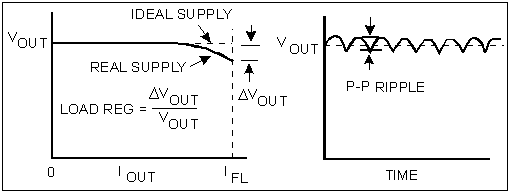
Idealnya, pengubahan daya ke DC memiliki karateristik seperti misalnya efisiensi 100%, gelombang keluaran yang tetap (constant output) walaupun dihadapkan pada variasi dari voltase transmisi (untuk power supply DC), arus pada beban, maupun suhu. Karakteristik ideal lainnya adalah tidak memiliki impedansi pada terminal keluaran (zero impedance output) untuk setiap jenjang frekuensi, dan juga tidak memiliki gangguan (noise) maupun ripple pada gelombang keluaran. Gambar 1 menunjukkan perbedaan dalam hal pengaturan beban dan ripple pada gelombang keluaran antara pengubah yang ideal dan yang praktis.
Gambar 1. Karakteristik ideal dan praktis pada pengubah ke DC
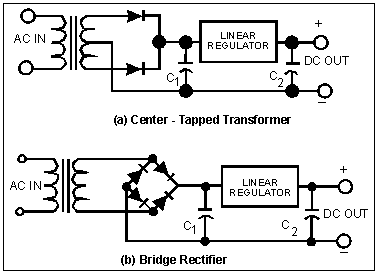
Selanjutnya, pada Gambar 2 dapat dilihat dua buah contoh rangkaian yang umum dipakai untuk menghasilkan daya DC dari daya AC yaitu rangkaian dengan konfigurasi Center-Tapped Transformer dan Penyearah Bridge (Bridge Rectifier). Kedua contoh tersebut memakai penyearah jenis gelombang penuh (full wave rectifier) yang mengakibatkan tingkatan ripple yang minimum pada gelombang keluaran.
Pada konfigurasi Center-Tapped Transformer, hanya terdapat dua buah dioda didalamnya dan dengan demikian hanya ada satu penjatuhan tegangan (voltage drop) pada dioda disetiap jalur arus dari transformer ke filter kapasitor. Lain halnya dengan konfigurasi Bridge yang menggunakan empat buah dioda, sehingga mengakibatkan dua voltage drop pada dioda disetiap jalur arus dari sisi transformer ke sisi filter. Namun demikian, walaupun Center-Tapped memiliki keuntungan pemakaian komponen yang lebih sedikit, namun setiap dioda paling tidak harus menahan tegangan balik (reverse voltage) yang besarnya dua kali lipat dari pada setiap dioda yang digunakan pada konfigurasi Bridge. Pada Gambar 2 juga terlihat adanya blok yang berisikan pengatur linier (Linear Regulator). Blok tersebut tidak lain berfungsi sebagai pengatur level daya sesuai dengan level yang diminta oleh beban dan secara bersamaan juga menekan tingkat ripple pada gelombang keluaran.
Gambar 2. Dua jenis rangkaian tipe linier

Regulator Switching
Power Supply tipe switching menjadi semakin populer pemakaiannya karena tipe ini memberikan penyediaan daya DC yang efisiensi dan densitas dayanya sangat tinggi dibandingkan dengan tipe linier. Untuk lebih jelasnya, beberapa perbandingan antara kedua tipe tersebut dapat dilihat pada Tabel 1.

Spesifikasi Tipe Linier Tipe Switching
Pengaturan Beban (Load regulation)
Variasi Gelombang Keluaran (Output Ripple)
Variasi Voltase masukan (Input Voltage Range)
Efisiensi
Densitas Daya (Power Density)
Waktu Peralihan (Transient Recovery)
0.02-0.01%
0.5-2 mV rms
+/- 10%
40-55%
0.5 W/in^3
50 usec
0.1-1.0%
25-100 mV p-p
+/- 50%
60-80%
2.3 W/in^3
300 usec

Teknologi penyediaan daya DC melalui tipe switching sebenarnya bukan merupakan hal yang baru. Teknologi tersebut sudah mulai dikembangkan sejak sekitar tahun 60-an dan penggunaannya sangat terbatas pada aplikasi militer dan ruang angkasa karena komponen switch yang masih mahal dan kemampuan dayanya juga terbatas. Namun, karena semakin pesatnya perkembangan teknologi solid state termasuk didalamnya, pembuatan solid state switch, maka kedua halangan tersebut semakin lama semakin berkurang sehingga produksi tipe switching ini pun merembet perkembangannya ke lapangan industri, penelitian, pendidikan dan lain sebagainya.
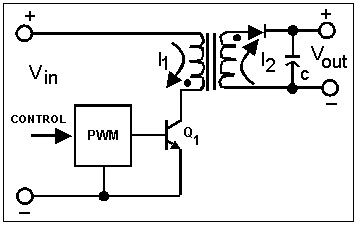
Dari segi efisiensi, tipe linier tidak begitu baik, karena pada prosesnya hasil keluaran penyearah diturunkan tegangannya melalui pengatur linier (linear regulator), dan selisih antara tegangan yang masuk dan tegangan yang dihasilkan dibuang dalam bentuk panas. Akibat penyerapan panas (pembuangan energi) yang besar dalam proses tipe linier tersebut sehingga efisiensinya pun menjadi kecil. Sedangkan pada tipe switching, perbaikan efisiensi dicapai dengan cara pengaturan medan magnet akibat selisih tegangan masukan dengan keluaran. Pengaturan yang dimaksud berhubungan dengan proses penyimpanan dan pembuangan energi magnet yang mana pada waktu komponen penyimpan energi magnet sampai pada titik energi tertentu, maka switch yang dipakai untuk mengirim daya ke sisi beban dimatikan (off state), dan komponen penyimpan energi magnet tadi kemudian mengambil alih tugas switch untuk mengirim daya yang tersimpan menuju ke sisi beban. Apabila ‘tabungan’ energi magnet tadi hampir habis, maka switch kembali dihidupkan (on state) untuk mengambil alih kembali tugas pengiriman daya ke beban dan secara bersamaan mulai menyimpan kembali energi magnet untuk mengulang proses yang sama.
Gambar 3. Rangkaian dasar Flyback Regulator
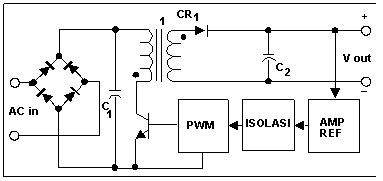
Salah satu topologi dari power supply tipe switching adalah dengan metoda flyback (flyback regulator) seperti yang diilustrasikan pada Gambar 3. Pengaturan besarnya daya keluaran melalui komponen switch dikendalikan dengan metoda modulasi lebar pulsa atau PWM (Pulse Width Modulation) dimana semakin lama switch berstatus ON semakin banyak energi yang disimpan dalam transformer dan semakin besar pula daya yang dikirim ke beban. Selain itu, untuk menghasilkan tegangan keluaran yang stabil, maka tegangan tersebut dapat diumpan balik dan dibandingkan dengan tegangan referensi (reference voltage) dan selisihnya kemudian dapat digunakan untuk mengendalikan lamanya switch berstatus ON dan OFF. Pada gambar 4, dapat dilihat konfigurasi lengkap dari metoda Flyback tersebut. Sebutan lain power supply tipe switching adalah tipe "off-line" karena tegangan DC yang menjadi masukan adalah melalui proses penyearah langsung dengan penyearah Bridge dari sisi AC atau dari jaringan listrik dengan tanpa menggunakan transformer 50 atau 60 Hz. Pada rangkaian yang sama juga terlihat adanya sistim umpan balik yang harus terisolasi dari sisi AC dengan menggunakan transformer ukuran kecil ataupun dengan opto-isolator.
Gambar 4. Rangkaian lengkap Flyback Regulator
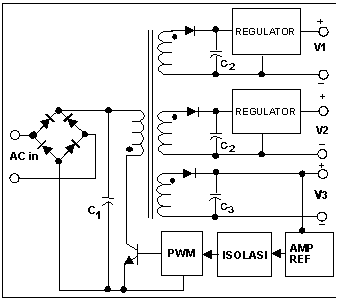
Banyak power supply dari tipe switching yang memiliki lebih dari satu keluaran. Banyaknya keluaran tersebut akan sangat berguna karena sering kita jumpai bermacam peralatan elektronika seperti halnya dalam sistim komputer yang membutuhkan tegangan atau daya yang berbeda beda untuk bermacam bagian atau komponen didalamnya.
Gambar 5. Rangkaian Flyback dengan keluaran lebih dari satu

Gambar 5 menunjukkan salah satu rangkaian Flyback yang dapat menghasilkan lebih dari satu keluaran. Pada gambar tersebut terlihat bahwa hanya satu keluaran saja yang memiliki umpan balik, sehingga keluaran keluaran yang lain tidak akan begitu teregulasi dengan baik. Masih banyak lagi contoh topologi lainnya yang digunakan untuk penyediaan daya DC baik itu dengan satu atau lebih keluaran seperti misalnya pengubah Forward, Buck, Boost, Cuk, Push-Pull, Full Bridge, Half Bridge, Sepic dan lain lainnya.

Sumber: http://www.elektroindonesia.com
Website counter [Close]